What your crew sees on their phone
One screen, today’s stops in order, and everything needed before getting out of the truck.
It is not a smaller office
The field app is one screen: today’s stops in order, the current one first, sized for a gloved hand and set to be readable in sun.
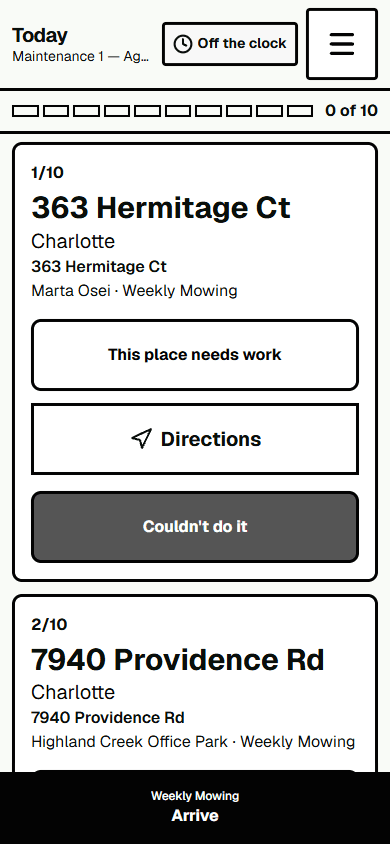
The stop card
Everything needed before getting out of the truck is on the card, because a second tap to find a gate code is a second tap nobody makes.
The card shows the address, service, and property conditions. Office work steps appear under “Job notes.” “Legacy note — type unknown” has no recorded category; ask Dispatch if it is unclear or conflicts with the job.
Check the Access condition before starting. It may include a call-ahead instruction, such as “Call 10 min ahead.” If a property condition is unclear, check with Dispatch.
Arriving and finishing
Mark the stop as arrived when you reach it, and complete it when the work is finished. Arrive may include an approximate location if the phone provides one; location is not required. Completing a stop does not require or automatically record a location. For a service visit, a chosen photo may include location and camera-direction details when the phone provides them. Project tasks do not offer photo capture.
When the work is finished, open Complete. Add a short note about the work, then choose Confirm complete. For a regular service visit, Materials used can be left blank and no photo needs to be attached.
Hours
Clocking in and out happens on the same screen, against the crew they are riding with today. Somebody with no route still clocks in against their own crew rather than against nothing.
Signal
Properties are not always where signal is. The phone shows when it is offline and when it has work waiting to go up, so a crew can tell the difference between sent and will send. It does not pretend.
English or Spanish
The switch is in the menu on the crew’s own screen and does not need the office to set it. The first thing somebody does with a shared handset is put it in their own language, and that should not wait on anything.